Notifications
Here you can configure the receiving of online notifications for the Monitoring tab so that to get them only from certain resources, and not from all the resources you have access to. For each resource, you can also indicate the notification conditions that should be received.
The Notifications tab is only available to the top users and to the users with dealer rights.
There are two lists on the tab. The resources are selected in the left list and the notification conditions in the right one.
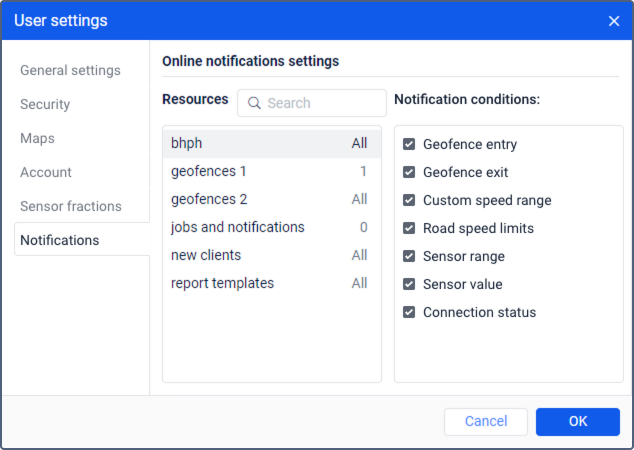
Next to the name of the resource, the number of notification conditions selected for it is displayed, and in the tooltip of the digital indicator, their list.
To configure the notification filtering for a resource, you should have full access to it.
By default, all resources and all notification conditions for them are selected. To modify the list of notification conditions that should be received from a resource, select it in the list on the left. To quickly find a resource, use the dynamic filter. In the list of notification conditions, mark the ones you want to receive.
You can configure the notifications filtering so that it is applied to multiple resources at the same time. To do this, select the resources while holding the Ctrl key and mark the notification conditions in the list on the right. A black checkbox next to a notification condition means that the settings of the selected resources differ (that is, for some resources, this condition is marked and for the others, it is not).
In the online notifications window, there is a filter by notification condition which is available to the top-level users and to the users with dealer rights.