Background service processes
The Status tab contains two sections related to background service processes: one for monitoring running processes and one for viewing the process history.
Running background service processes
The Running background service processes section displays all background processes that are currently active.

You can view the type of each process (such as database synchronization, database defragmentation, message deletion, and so on) and its current completion status.
History of background service processes
The History of background service processes section provides a persistent log of all executed background processes, including those that completed successfully and those that resulted in errors. It helps administrators investigate issues such as failed database defragmentation or other unexpected failures.
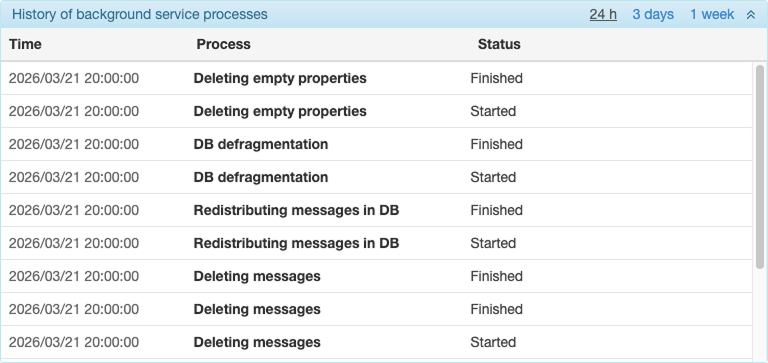
You can filter the history by period using the tabs in the section header: 24h, 3 days, or 1 week.
Each record in the history contains the following columns:
| Column | Description |
|---|---|
| Time | The timestamp when the process event occurred. |
| Process | The type of the background process (see process types below). |
| Status | The result: Started, Finished, or an error description (see statuses below). |
If there is no history for the selected period, the message “No background process history for the selected period” is displayed.
Process types
The following process types can appear in the history:
- Full DB resynchronization
- Processing message sync cache
- Processing property sync cache
- Processing file sync cache
- DB defragmentation
- Redistributing messages in DB
- Processing message cache
- Backing up units
- Deleting macro-objects from trash
- Deleting micro-objects from trash
- Deleting messages
- Deleting empty properties
- Backing up resources
Statuses
The successful start and completion of a process are indicated by the Started and Finished statuses, respectively. The following error statuses may also appear:
- Failed to access the database during synchronization
- Failed to process archived messages
- Not enough memory to process the message
- Failed to read messages from the database
- Memory allocation failed
- Failed to read data from cache
- Invalid response from the synchronization server
- Incomplete data received
- Database defragmentation failed