Log
The log shows real-time information about the reception of unit messages, sent and executed commands as well as about user actions.
To open the log, click on the icon  in the bottom panel.
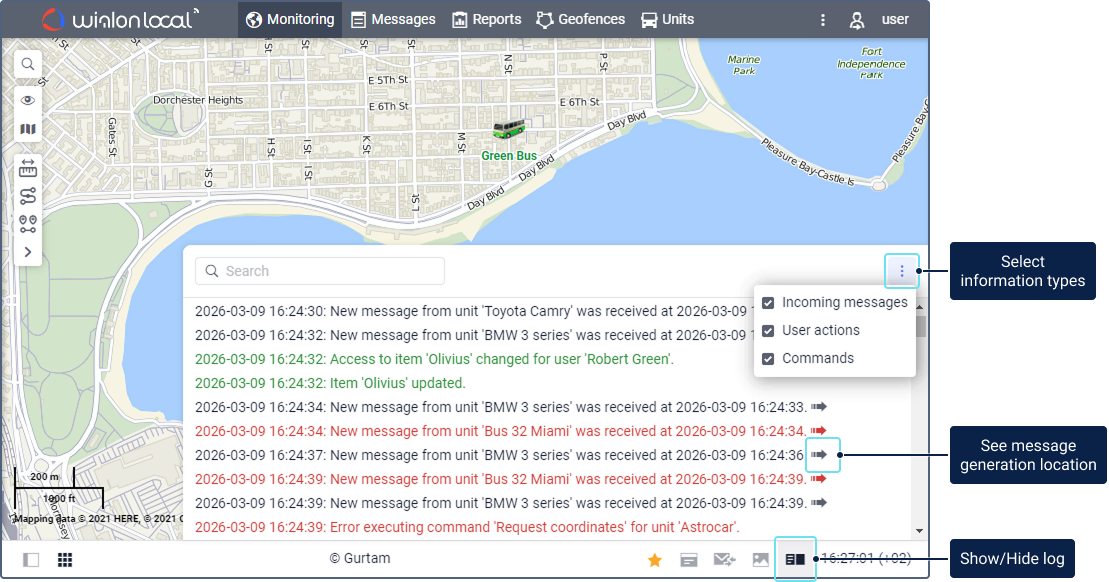
To select the types of information which should be shown in the log, click on the icon  and select the required items.
| Item | Description |
|---|---|
| Incoming messages | Records of the messages received from the units which are in the work list of the Monitoring tab. If a message contains data on the unit location, the icon  is shown at the end of the record. Click on it to see the place of sending the message on the map. is shown at the end of the record. Click on it to see the place of sending the message on the map.If messages are sent from the black box or retransmitted, the log shows only those that have been generated no earlier than one hour before the last message with coordinates. |
| User actions | Records of your actions in the monitoring system: creating, editing, deleting elements, etc. |
| Commands | Records of the commands sent to the units and their execution. |
Different colours are used to display text in the log:
- black: for records of the received unit messages;
- green: for records of the user actions, sent and executed commands;
- red: for records of errors and the received SOS messages from the units.
To quickly find the required record, use the dynamic search.
You can change the log size by dragging its border or corner.