Integrations (Wasl)
The Integrations section of the management system is designed for integrating Wialon with third-party services.
Here you can configure transmitting data from Wialon to the Wasl platform. This feature is available only to the top users and users with dealer rights for whom the Integrations: Wasl Tracking Service as well as the Wasl and Drivers modules are activated. Besides, the Store registration time option should be enabled on the System tab in the administration system.
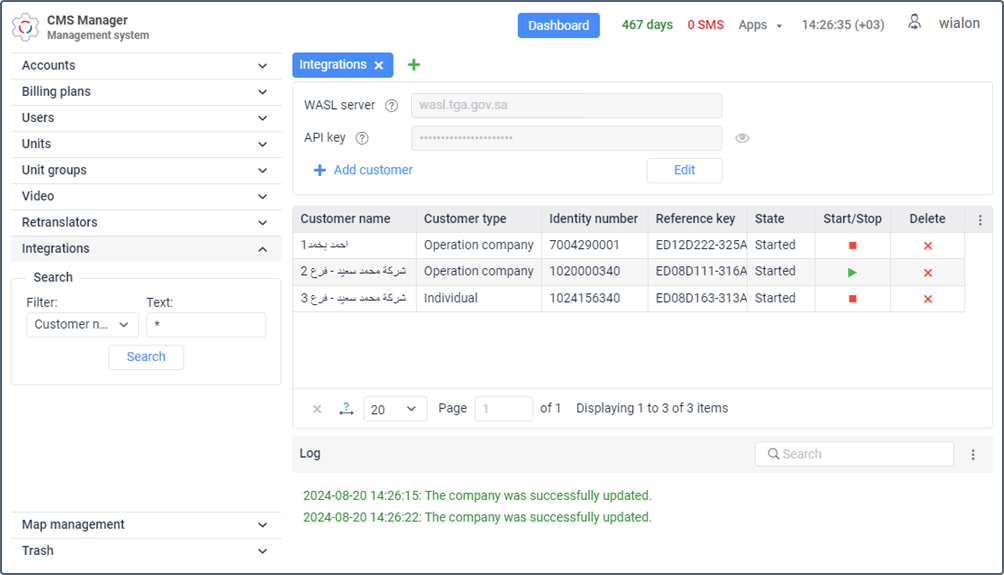
The process of configuring data transmission consists of the following stages:
- configuring sites in the administration system;
- configuring hardware;
- specifying the API key;
- registering a customer;
- registering drivers;
- registering vehicles.
A stable connection between Wialon Local and
http://app-local.wialon.comis required for correct data transmission to the Wasl platform.
Configuring hardware
In order for the device to send data correctly, configure it considering the following requirements:
- It should send coordinates only in chronological order.
- It should send data every two minutes when the vehicle is moving.
- It should send data every hour when the vehicle is parked and the ignition is off, and every two minutes if the vehicle is parked and the ignition is on.
- It should report ignition status changes, sensor failures, and traffic accidents immediately or 30 seconds after they occur. If such configuration is not possible, the device should send data every 30 seconds.
Specifying the Wasl server and API key
On the Integrations tab, fill in the Wasl server and API key fields and click Save.
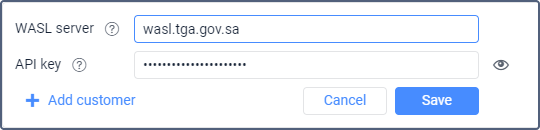
| Field | Description |
|---|---|
| Wasl server | The address of the Wasl server to which data from Wialon should be transmitted. |
| API key | The API key obtained after registering on the Wasl platform. |
The specified server and key are used for all the customers you register. If you want to edit these fields, click Edit, enter new data, and save it.
Now you can proceed to register customers, drivers, and vehicles.