Speedings
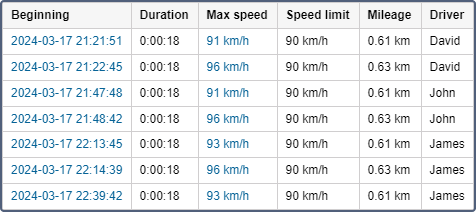
The Speedings table shows speed limitation violations. The speed limit depends on the method for determining the speeding selected in the properties of the unit on the Advanced tab.
If the Road limitations method is selected on the Advanced tab, speeding in the report is determined in accordance with the limitations from maps that were in force at the moment of speeding.
The information which can be presented in the Speedings table is described below.
| Column | Description |
|---|---|
| Beginning | The date and time when the speed limit was exceeded. |
| Location | The location of the device at the moment of speeding. |
| Duration | The time interval during which the unit was moving with an excessive speed. If the speeding was determined by one message, in the line 00:00 is written. In order for the speeding to be determined also by one message, it is necessary to indicate 0 as the minimum speeding time in the advanced properties of the unit. |
| Total time | The time from the beginning to the end of speeding. It is recommended to use this column in combination with the grouping parameter or the Total row. If the Total row is configured in the table, it shows all the time that elapsed from the start of the first speeding to the end of the last one. |
| Max speed | The maximum speed within the period of speeding. |
| Speed | The speed at the time of the maximum speeding, that is, at the moment of the maximum difference between the permitted and actual speed. |
| Speed limit | The maximum allowed speed on a particular road section or in the unit properties. |
| Mileage | The distance travelled with the exceeded speed. |
| Mileage (adjusted) | The mileage subject to the coefficient set in unit properties (the Advanced tab). |
| Initial mileage | The mileage sensor value at the moment of the beginning of speeding. If no saving of mileage parameter was made through the reported period, the mileage is counted from 0. |
| Final mileage | The mileage sensor value at the end of the speeding interval. |
| Avg speed | The average speed within the interval. |
| Driver | The name of the driver (if identified). |
| Trailer | The name of the trailer (if it was assigned). |
| Count | The number of speed violations. |
| Notes | An empty column for your custom comments. |
| Video | Video files received from the unit. |
| Image | The images received from the unit. Viewing images in reports and the functions available while doing this are described here. |
Interval filtering (by speeding duration, mileage, driver, geofences/units) can be applied to the Speedings table.
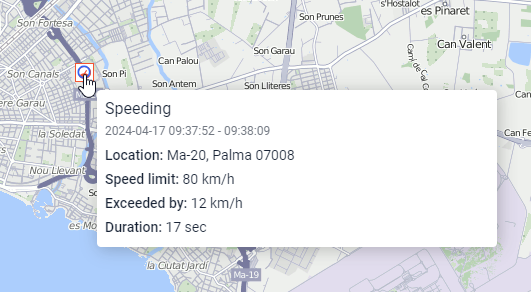
You can use Speeding markers for this table:
Other means to control speed are described in the notifications.