Video

Prerequisites

To access the Video tab, the Video monitoring and Units: Commands services must be enabled in the properties of the user account or billing plan. The tab displays only the units that have been added for billing in the management system.

The required access rights depend on which video features you need to use:

File viewing

To see units on the Video tab, view and download existing video files, run video-related reports, and see video markers on unit tracks, you must have the following access rights to a unit:

  • View video
  • View object and its basic properties
  • View detailed object properties
  • View connectivity settings
  • Request reports and messages

Stream and playback access

To save video files, watch live stream (including on minimaps), and play back video, you must have the following access rights to a unit:

  • All access rights from the File viewing level
  • Send commands
  • View commands
  • Create, edit, and delete commands

Full video management

To delete files, modify unit video settings, and manage the unit in the Video section of CMS Manager (for example, to enable video, purchase traffic packages, and view statistics), you must have the following access rights:

  • Manage video
  • All access rights from the Stream and playback access level

The monitoring system supports the H.265 codec. Ensure that both your browser and your system are compatible with this codec.

On this tab, you can receive live streams from the unit cameras, watch saved video files, request videos for the past period, and work with them.
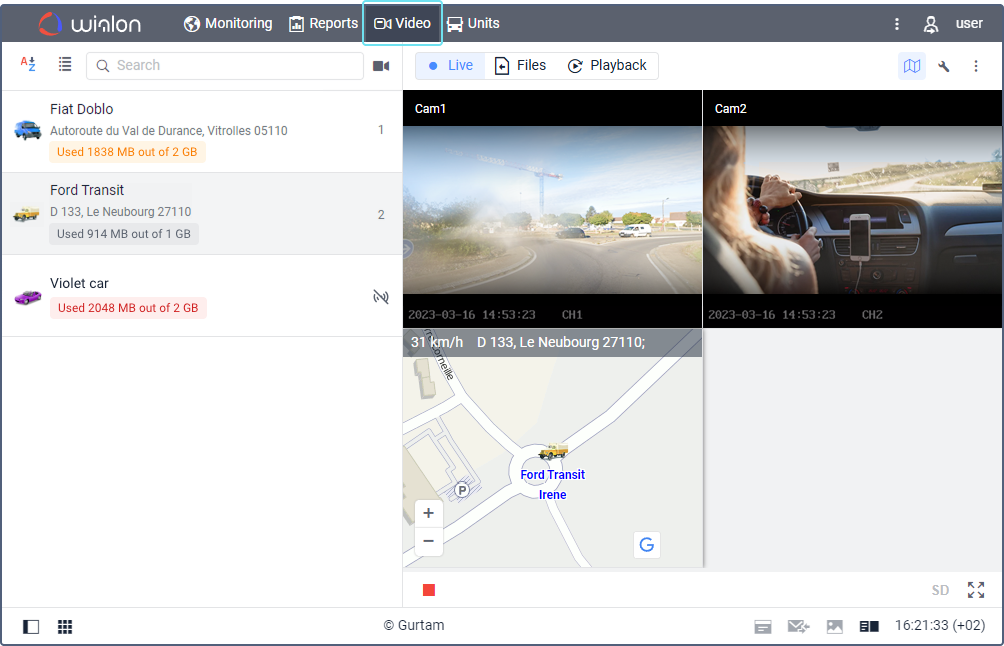
To work with video, select the required tab.

Tab Function
Live stream Watching live streams from the unit cameras and monitoring the unit movement on the map.
Files Viewing and deleting the saved files.
Playback Requesting a playback for the past period and saving the required excerpts as files.

Questions and answers

I have a video device which is not in the list of the supported ones. How can I integrate it with Wialon?

Video monitoring in terms of GPS tracking is quite a young industry therefore not all video devices are suitable for working with GPS tracking platforms. To integrate a video device with Wialon, it should meet some requirements from our side. If you want to have your device supported in the system, kindly email us at hw@wialon.com and we will analyze the possibility of integration.

Video: Wialon video module

You can find information about video monitoring in the following video dated 01.02.2022:

If you find a mistake in the text, please select it and press Ctrl+Enter.

Report a mistake

Your message was sent. Thank you!

An error occurred while submitting the form