Purchasing traffic packages
As soon as traffic available for units ends, you should buy new traffic packages for them. Otherwise, video monitoring features become unavailable for such units.
To purchase traffic packages for a lower-level account which is not directly subordinate to yours, the Video monitoring service should be enabled for the accounts which are located between this one and yours in the hierarchy.
If the amount of traffic available for one or more units is 100 MB or less, a system notification is received. It shows the names of accounts that contain such units and the number of these units. Click Show to go to the unit table of the account. The units running out of traffic are shown on a red background. You should buy new traffic packages for them.
There are three ways of purchasing traffic packages:
- purchasing packages for one unit;
- purchasing packages in bulk;
- purchasing packages automatically.
The information about charges for traffic packages purchase is displayed on the Statistics tab in the account properties or in the user settings.
On the first day of each month, the amount of purchased and used traffic is reset: the remaining traffic is not accumulated, and a new package is purchased automatically for every unit.
A traffic package equals to 1024 MB.
Purchasing packages for one unit
To buy traffic packages for one unit, specify their number in the Package purchase column and click Purchase. You can enter the number of packages manually or set it using the arrow icons. The maximum allowed value is 99.
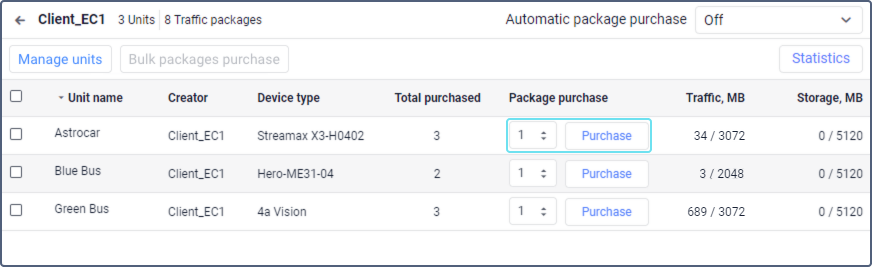
A record of purchasing traffic packages is shown in the log.
After clicking on the Purchase button, the traffic packages will be acquired. The action cannot be cancelled.
Purchasing packages in bulk
You can purchase traffic packages for several units at the same time. To do this, follow the steps below.
- Select the units for which you want to buy traffic packages. To select all the units at once, check the box next to the Unit name heading.
- Click Bulk package purchase.
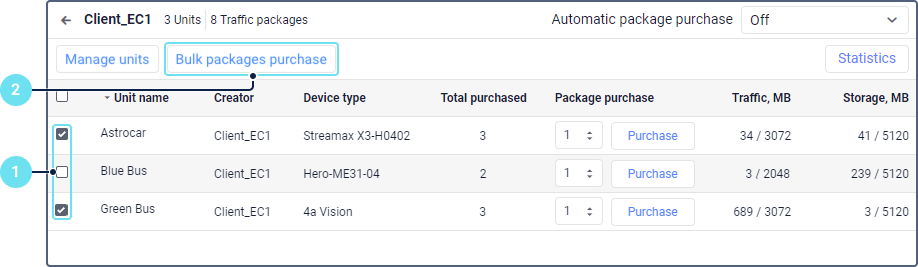
- Specify the number of packages you want to buy for each of the selected units. You can enter the number of packages manually or set it using the arrow icons. The maximum allowed value is 99.
- Click Purchase.
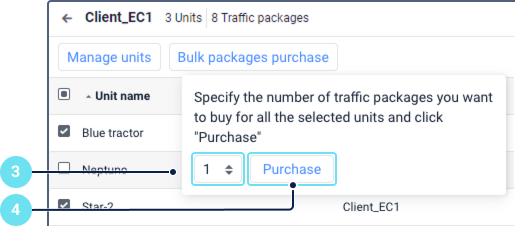
- Confirm the action. Purchased traffic packages cannot be returned.
A record of purchasing traffic packages is shown in the log.
Purchasing packages automatically
In addition to buying traffic manually, you can use the automatic purchase of packages. After configuring it, a new package is automatically purchased for a unit as soon as the available traffic runs out. This allows avoiding situations in which video monitoring features become unavailable due to a sudden lack of traffic.
By default, the automatic purchase of packages is disabled. To enable it, select the maximum number of packages per month (the limit) that can be purchased for each unit, or select No limit.
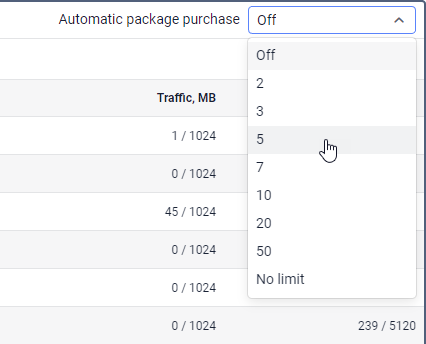
To purchase packages automatically, the system checks for available traffic every 15 minutes. Thus, a new traffic package is purchased immediately after the previous one is used up. A record of its purchase is shown in the unit log. When the number of packages purchased for a unit (the value in the Total purchased column) reaches the limit, the automatic purchase is no longer available for this unit. In this case, you should buy a new package for the unit manually or set a higher limit on the number of packages per month.
If you select No limit, the number of traffic packages that can be purchased for a unit every month is unlimited.
You can change the limit on the number of packages anytime. A record of the change is shown in the log.
Video traffic consumption
Traffic from a purchased package is spent only when video data is transferred from the device to the Wialon server. Actions with the video that is already stored in Wialon don’t consume traffic.
The traffic is counted by the amount of data received from the device, not by the time the video plays. This means that the same minute of video can spend a different amount of traffic depending on the video quality, the number of enabled cameras, and the device settings.
| Action | Consumes traffic | Details |
|---|---|---|
| Watching a live stream | Yes | The traffic is counted while the stream is playing. |
| Requesting a playback | No | Only the list of the device files is requested. |
| Watching a playback | Yes | The traffic is counted while the video is playing. |
| Saving a video excerpt from a playback as a file | Yes | The file is transferred from the device to the Wialon storage. |
| Saving a video by a notification with the Save a video as a file action | Yes | The file is transferred from the device to the Wialon storage. |
| Receiving files of the events detected by the device (the Receive files of events detected by device option) | Yes | The device sends such files automatically, so the consumption can grow significantly. |
| Watching a file saved in Wialon | No | The file is played from the Wialon storage. |
| Downloading or sharing a file saved in Wialon | No | The file is taken from the Wialon storage. |
To reduce the consumption, watch live streams and playbacks only when you need them, use the standard video quality, and enable only the cameras you want to see. The system also stops the video if you don’t confirm that you’re still watching it. See the Watching confirmation section.
Checking the available traffic
Before a live stream starts, the system checks the traffic available for the unit. If the traffic of the current package is used up, the stream doesn’t start. While the video is playing, the system keeps checking the available traffic and stops the stream as soon as the package is used up. To continue working with video, purchase a new package or set up the automatic purchase of packages.
You can check the used and purchased traffic of a unit on the Video tab, in the unit table of the management system, in statistics, and in the video traffic report.