Fuel traffic
The Fuel traffic table is designed to display the data about fuel fillings and drains, as well as the intervals of operation of the counter sensor of the unit. For each type of activity (fuel filling, drain, counter operation) you can customize its interval filtering in the parameters of the table.
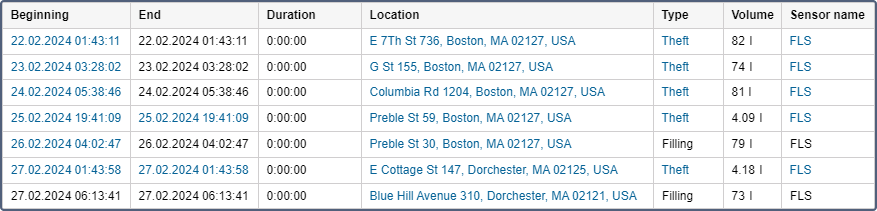
If in the filtering parameters there are other selected units and at the moment of activity they were close to the unit for which the report is executed, the algorithm of fuel fillings analysis is run. Thus, when executing, for example, a report on a tanker, one can see not only its fuel activity but also the amount of fuel received by the units near it (at least one message from such units should be received during the activity interval from a distance less than the radius specified in the filtering parameters).

Read about setting the parameters used in the report on the Additional properties and Additional settings of FLS pages.
The Fuel traffic table can include the columns described below.
| Column | Description |
|---|---|
| Beginning | The activation time of the sensor, the time of the fuel filling or drain depending on the type (see below). |
| End | The deactivation time of the sensor, the time of the fuel filling or drain depending on the type. |
| Duration | The time from the beginning to the end (0 for fuel fillings and drains). |
| Location | The position of the unit while sending the data (is associated with the End field). |
| Type | The kind of the current activity determined by the system (filling, drain, counter operation). |
| Volume | The quantity calculated by the counter sensor or the data from the Filled or Drained columns taken from the columns of the same name in the corresponding tables depending on the type. |
| Sensor name | The name of the sensor by which the type was determined. |
| Geofences/Units | The column includes the names of the geofences or units with which an intersection was recorded during a given interval. Necessary geofences and units are indicated in the filtering parameters. If there are several geofences or units that have been triggered, the report displays the name of the geofence with the smallest surface or the name of the unit with the smallest radius of approximation. If the sizes coincide, all the names are included. |
| Filled | The sum of the fuel fillings (if any) of the units shown in the Geofences/Units column. Only the fillings registered automatically and the time of which is within the interval from Beginning to End are taken into account. |
| Deviation | The difference between the values of the Volume and Filled columns. |
| Driver | The name of the driver assigned to the unit on the current interval. |
| Notes | An empty column where you can introduce your custom comments after you have printed or exported the report. |
The Fuel traffic table may show rows with fillings and drains marked as false. To do this, the Show false events option must be enabled in the report settings.