Transferring unit properties
You can copy most of the properties from one unit to another or save them to a WLP file using the import and export tool. The exceptions are:
- user access rights;
- unit group membership;
- information about the creator and the account.
To copy the access rights and the unit group membership, you can create a copy of the unit (the icon
) and in the Creator field, select the user whose account the unit should belong to.
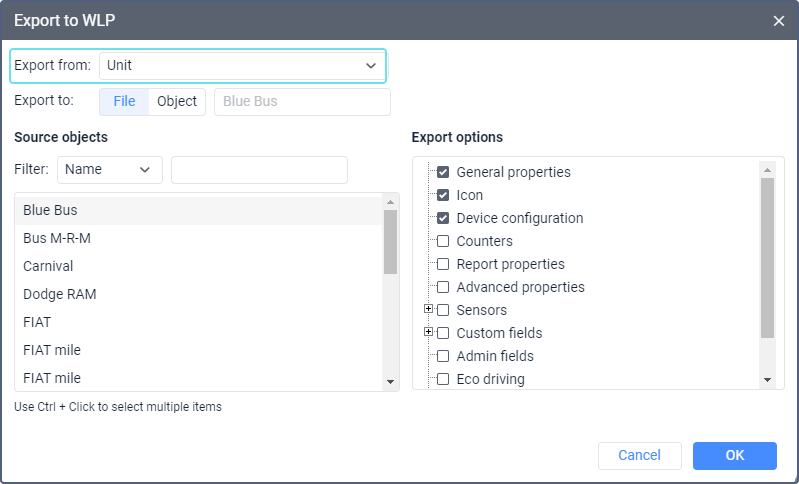
To export unit properties, select the Export to WLP item in the user menu and select Unit in the Export from drop-down list. See a detailed guide here.
To add the properties of one unit to another using a WLP file, select the Import from WLP item in the user menu and follow the guide.
Exportable properties
Below are the unit properties you can export.
| Property | Description |
|---|---|
| General properties | The device type, name, phone number(s), unique ID, access password (the General tab).Units with the same ID and units and/or drivers with the same phone numbers within the same device type cannot exist in the system. Such fields are cleared during import. You can edit them later. |
| Icon | The icon of the unit and the state of the Rotate icon option.To export an icon uploaded by the user, you should have the View object and its basic properties access right to the unit the icon of which you want to export. |
| Device configuration | The parameters of the device configuration. They can be available for some types of devices on the General tab after clicking on the icon  . . |
| Counters | The current values of counters and the state of the options for calculating them (the General tab). |
| Report properties | The parameters from the Additional settings, Speeding, and Driver activity sections of the Advanced tab. |
| Advanced properties | The speed source, the color parameters and the message validity filtering parameters from the Advanced tab. |
| Sensors | The contents of the Sensors tab. Below you can find more information about the import of sensor validators. |
| Custom fields | The contents of the Custom fields tab. |
| Administrative fields | The administrative fields from the Custom fields tab. |
| Commands | The contents of the Commands tab. |
| Eco Driving | The contents of the Eco driving tab. Below you can find more information about the import of eco driving criteria. |
| Profile | The contents of the Profile tab. Below you can find more information about the import of vehicle types. |
| Trip detector | The contents of the Trip detector tab. |
| Service intervals | The contents of the Service intervals tab. |
| Health check | The contents of the Health check tab. |
Import of eco driving criteria
If you import eco driving criteria and select the Replace or Merge import types, the system always applies the Replace type, that is, the previous criteria are deleted and the new ones are entered. If you select the Append type and the destination unit has some criteria which are different from that of the source unit, then these criteria remain the same and the new ones are not added. If the destination unit has no such criteria, the system adds the new ones.
If sensors or sensor validators are specified in the parameters of the eco driving criteria, then you should import these criteria together with the sensors or create the same sensors in the destination unit properties beforehand (see below).
Import of sensor validators
When importing sensors, the validator is saved only if the set and order of sensors in the source unit are completely identical to the ones of the unit to which they are imported.
Import of vehicle types
To import and export the profile properties of the unit, you should have the Manage custom fields access right to it.
You can import the vehicle type to the unit properties. To do this, you should specify the key of the vehicle type in the import file.
You can see the keys of vehicle types in the tables below.
The keys of cargo transport types:
| Vehicle type | Key |
|---|---|
| Pickup | pickup |
| Van | van |
| Truck | truck |
| Heavy truck | heavy_truck |
| Dump truck | dump_truck |
| Logging truck | logging_truck |
| Tractor unit | tractor_unit |
| Trailers and semi-trailers | trailers_semi |
| Tanker trailer | tanker_trailer |
| Tank truck | tank_trailer |
| Refrigerator van | refrigerator_van |
| Other | other_cargo |
The keys of passenger transport types:
| Vehicle type | Key |
|---|---|
| Kick scooter | kick_scooter |
| Bicycle | bicycle |
| Motorcycle | motorcycle |
| Passenger car | passenger_car |
| Minibus | minibus |
| Bus | bus |
| Trolleybus | trolleybus |
| Tram | tram |
| Other | other_passenger |
The keys of special machinery types:
| Vehicle type | Key |
|---|---|
| Agricultural machinery | |
| Tractor | tractor |
| Combine | combine |
| Sprayer | sprayer |
| Baler | baler |
| Agricultural spreader | agricultural_spreader |
| Mower | mower |
| Construction equipment | |
| Bulldozer | bulldozer |
| Excavator | excavator |
| Backhoe loader | backhoe_loader |
| Loader | loader |
| Skid-steer loader | skid_steer_loader |
| Forklift | forklift |
| Hooklift | hooklift |
| Crane | crane |
| Manipulator | manipulator |
| Bucket truck | bucket_truck |
| Concrete mixer | concrete_mixer |
| Concrete pump | concrete_pump |
| Piling and drilling rig | piling_drilling_rig |
| Crusher | crusher |
| Trencher | trencher |
| Pipelayer | pipelayer |
| Road roller | road_roller |
| Road grader | road_grader |
| Paver | paver |
| Scraper | scraper |
| Feeder | feeder |
| Special vehicles | |
| Ambulance | ambulance |
| Garbage truck | garbage_truck |
| Fire truck | fire_truck |
| Street cleaning machine | street_cleaning_machine |
| Tow truck | tow_truck |
| Other | other_special |
The keys of other vehicle types:
| Vehicle type | Key |
|---|---|
| Air transport | air_transport |
| Off-road vehicle | off_road_vehicle |
| All-terrain vehicle | all_terrain_vehicle |
| Snowmobile | snowmobile |
| Snowcat | snowcat |
| Rail transport | rail_transport |
| Water transport | water_transport |
| Recreational vehicle | recreational_vehicle |
| Other | other_vehicle |