Sharing activation codes

This page describes how to distribute unit activation codes across accounts.

Sharing a code with a subordinate account

By default, unit activation codes are available only to users that are creators of top accounts. To allow users that are creators of other accounts to manage codes (for example, to view, share, or unshare them), follow these steps:

  1. Make sure that the account to which you want to transfer the codes has dealer rights.
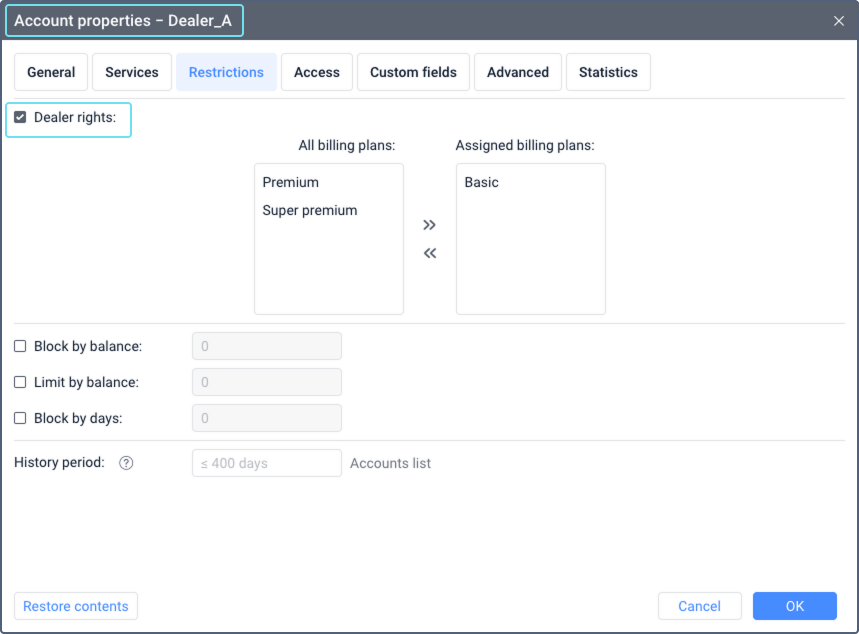
    Account properties window open to the Restrictions tab in CMS Manager. The Dealer rights option is visible with a checked box, indicating it is enabled. Other options and settings are listed in a table format.

  2. On the navigation panel of the top account, select Activation codes.

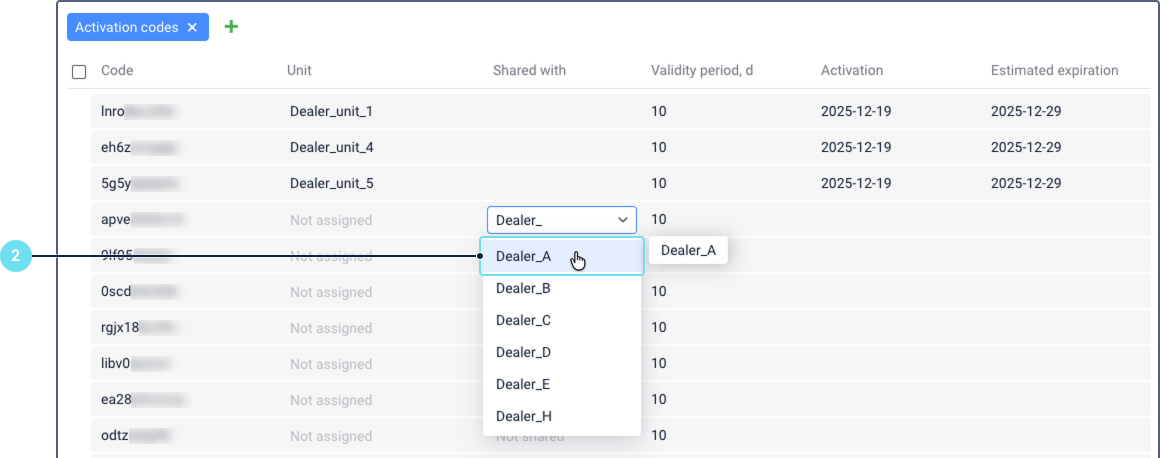
  3. In the Shared with column, select the account whose user should manage the code. You can only select one account.

    Activation codes section with columns for Code, Unit, Share with, Validity period, Activation, and Estimated expiration. The Share with column shows a dropdown list of accounts, with one account highlighted to indicate it is selected.

After this, the Activation codes item becomes available on the account navigation panel in CMS Manager. Now they can manage the shared code in the Activation code section: view it, assign it to a unit, reassign it to another unit, share the code with other subordinate accounts with dealer rights, and cancel these actions.

Questions and answers

What happens to the shared unit activation codes if I disable dealer rights for a subordinate account?

If you disable the Dealer rights option for a subordinate account, its creator will lose access to the Activation codes section in CMS Manager. This means they can no longer share or unshare codes.

However, the user can still use the codes previously shared with their account. To assign a code after dealer rights are disabled, the user must have a separate record of the code to paste into the unit properties.

I have shared a unit activation code with a subordinate account. Can I still assign the same code to a unit?

Yes, you can. However, be aware that assigning the code from your account doesn’t automatically unshare it from the subordinate account. The subordinate account will still have access to the code and could potentially assign it to a different unit.

To prevent this conflict and ensure your unit remains active, you should manually unshare the code from the subordinate account before you assign it to a unit.

Can I share an activation code that is already assigned to a unit?

No, an activation code can’t be shared while it is assigned to a unit. You must first unassign the code before you can share it.

Unassigning the code will immediately deactivate the unit it was assigned to.

Bulk sharing of codes with a subordinate account

To share several activation codes with an account at once, follow these steps:

  1. Follow steps 1–2 from the instructions above.
  2. Select the codes you want to share. To select all codes, check the box in the top row.
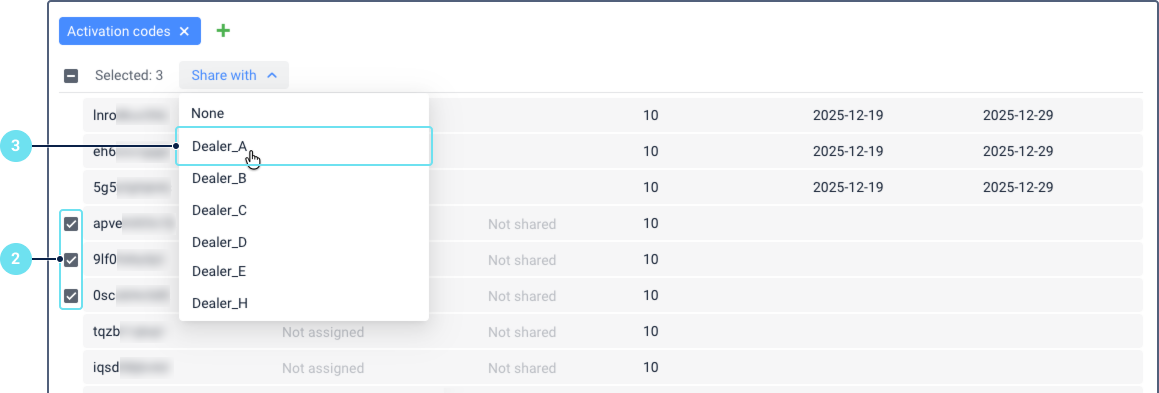
    Activation codes section with multiple codes selected. The Code, Unit, Share with, Validity period, Activation, and Estimated expiration columns are not visible. Instead the number of selected code is shown. The Share with column shows a dropdown list of accounts, with one account highlighted to indicate it is selected.
  3. Select the account for which the codes should be available. You can only select one account.

After that, the account creator can view and manage the shared codes in the Activation codes section in CMS Manager.

Unsharing a code from a subordinate account

You can unshare a unit activation code that you have previously shared with a subordinate account.

To unshare a code manually, follow these steps:

  1. In the navigation panel, select Activation codes.
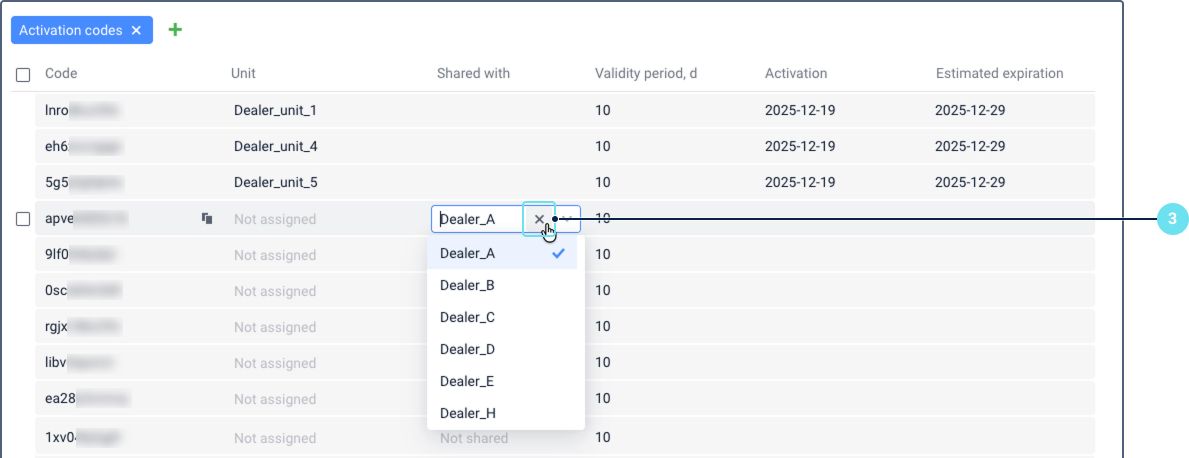
  2. Find the code you want to unshare and click on the name of the account it is currently shared with.
  3. Click the icon cross icon.
    CMS Manager Activation codes interface showing a list of codes in a data grid. A prominent X (cross) icon appears next to a shared account name in the first row, indicating the option to unshare the code. Other columns display Code, Unit, Shared with, Activation, and Estimated expiration information

After that, the code is removed from that account’s Activation codes section. However, if the user of that account has saved the code elsewhere (for example, copied it into a text file), they can still use it to activate a unit.

If a shared activation code has never been assigned to a unit, its validity period hasn’t started.

Automatic unsharing

An activation code is automatically unshared from a subordinate account when it is shared with another account. One code can’t be shared with two accounts at the same time.

If you find a mistake in the text, please select it and press Ctrl+Enter.

Report a mistake

Your message was sent. Thank you!

An error occurred while submitting the form