Configuring SMTP server settings
Who can do it: Service provider
Where: Wialon Platform Studio
By default, system messages (notifications, reports, etc.) are sent to service providers and customers from the platform@wialon.net email address. However, as a service provider, you can configure your own SMTP server to specify the email address that should be used instead. You can use a custom SMTP server or a third-party service, such as Gmail or Outlook.
To configure SMTP server settings, follow these steps:
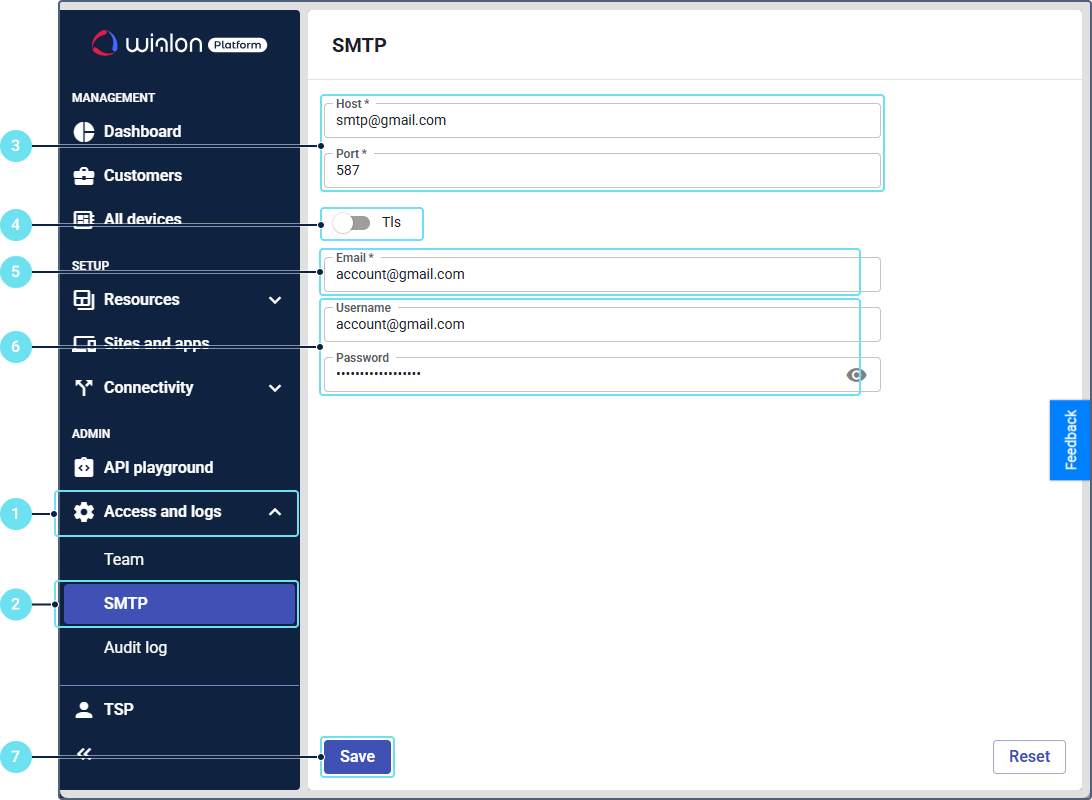
- In Wialon Platform Studio, expand the Access and logs section in the navigation menu.
- Open the SMTP page.
- Specify the host and port of your SMTP server.
- Enable the TLS option if your server requires an encrypted connection.
- Specify the email address from which system messages should be sent.
- Enter the username and password that should be used to log in to the mail system.
- Click Save.
After this configuration, system messages will be sent from the specified email address.