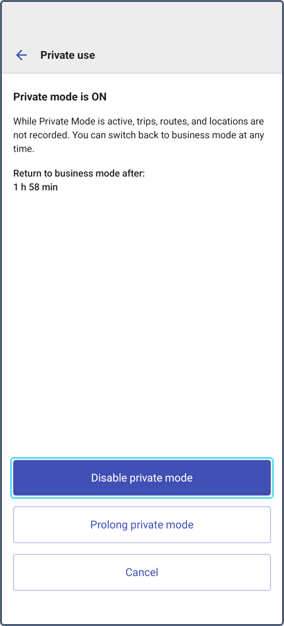
Managing private mode
Who can do it: Customer driver
Where: Wialon Driver mobile app
You can manage private use from Wialon Driver.
Enabling private mode in Wialon Driver
-
Open Wialon Driver.
-
Tap the Private mode button.
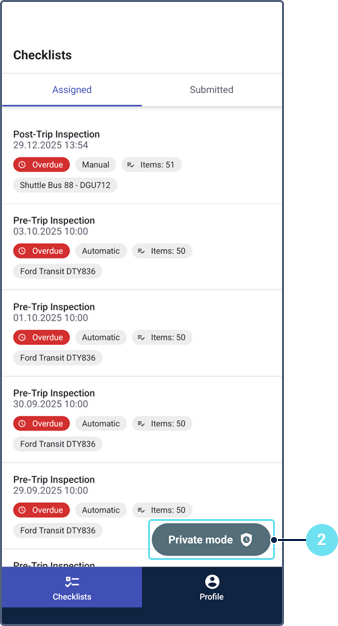
-
Select how long you want to enable private mode:
- Preset durations: 1h, 2h, 3h, 4h. After the specified period, the private mode is automatically disabled.
- Custom duration: enter the end date and time in the format:
MM/DD/YYYY, HH:MM, for example04/02/2026 19:20. The maximum duration is 30 days.
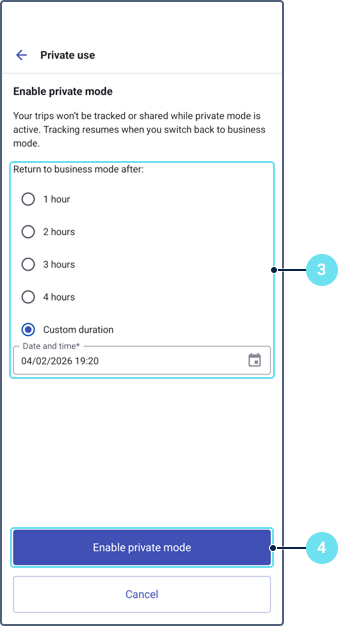
-
Tap Enable Private mode.
While a device is in private mode, Wialon Driver shows a dedicated private mode state. For details on how the private mode affects your device data, see the page Enabling private use mode for a device.
Prolonging private mode
To prolong private mode, follow the next steps:
-
Tap the Private mode button.
-
Tap Prolong private mode.
-
Select how long you want to prolong private mode:
- Preset durations: 1h, 2h, 3h, 4h. After the specified period, the private mode is automatically disabled.
- Custom duration: enter the end date and time in the format:
MM/DD/YYYY, HH:MM, for example04/02/2026 19:20. The maximum total duration is 30 days.
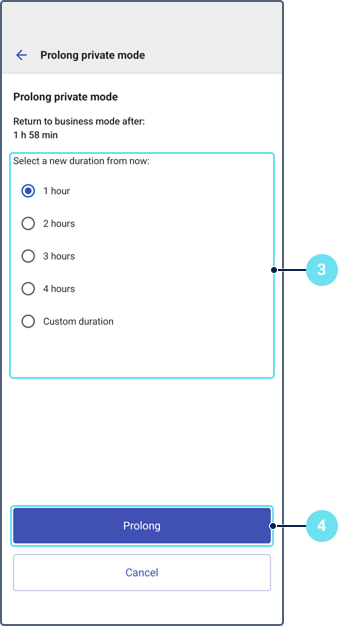
-
Tap Prolong.
To disable Private mode, tap the Private mode button and then tap Disable private mode.