Managing your profile
Who can do it: Customer driver
Where: Wialon Driver mobile app
To access your profile details, go to the Profile tab.
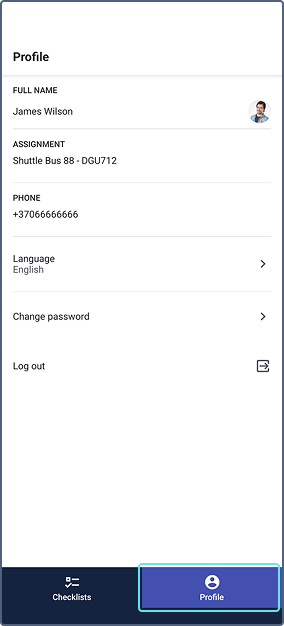
The Profile screen displays your current driver information and settings:
-
Full name and photo: Your registered driver identity.
-
Assignment: The vehicle currently assigned to you (for example, Shuttle Bus 88).
-
Phone: Your contact number.
Editing your name, photo, phone number and assignments are available for the fleet manager in Wialon FleetSpace.
-
Push notifications: allow or disable push notifications for this device. Make sure notifications are allowed for the Wialon Driver app in your mobile device settings. When enabled, you can receive notifications configured through the Send push notification action template by your service provider.
-
Language: Tap this to change the application language.
-
Log out: Tap the icon to sign out of the application.
Changing password
To update your security credentials in the application:
-
Select Change password from the list.
-
Fill in the fields following the listed security requirements. Tap the
 icon in any field to reveal the text.
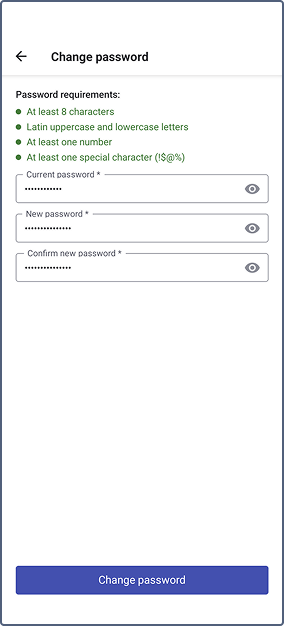
- Tap the Change password button to confirm.
See the guide for fleet managers for details on managing driver credentials in Wialon FleetSpace.
Supported languages
The Wialon driver app is supported in the following languages:
- Croatian
- Dutch (Belgium)
- English
- Estonian
- Finnish
- French
- German
- Greek
- Italian
- Polish
- Portuguese (Brazil)
- Portuguese (Portugal)
- Romanian
- Russian
- Slovenian
- Spanish
- Swedish
- Ukrainian
- Uzbek (Latin script)