Configuring the violation validation
When creating driver behavior criteria in Wialon Platform, you can configure violation validation for ensuring the accuracy and relevance of your fleet’s driver scores. By adding specific conditions, filter out minor or irrelevant incidents, focusing only on the behaviors that genuinely impact safety and efficiency. This process helps you create a more fair and precise scoring system that reflects driver performance.
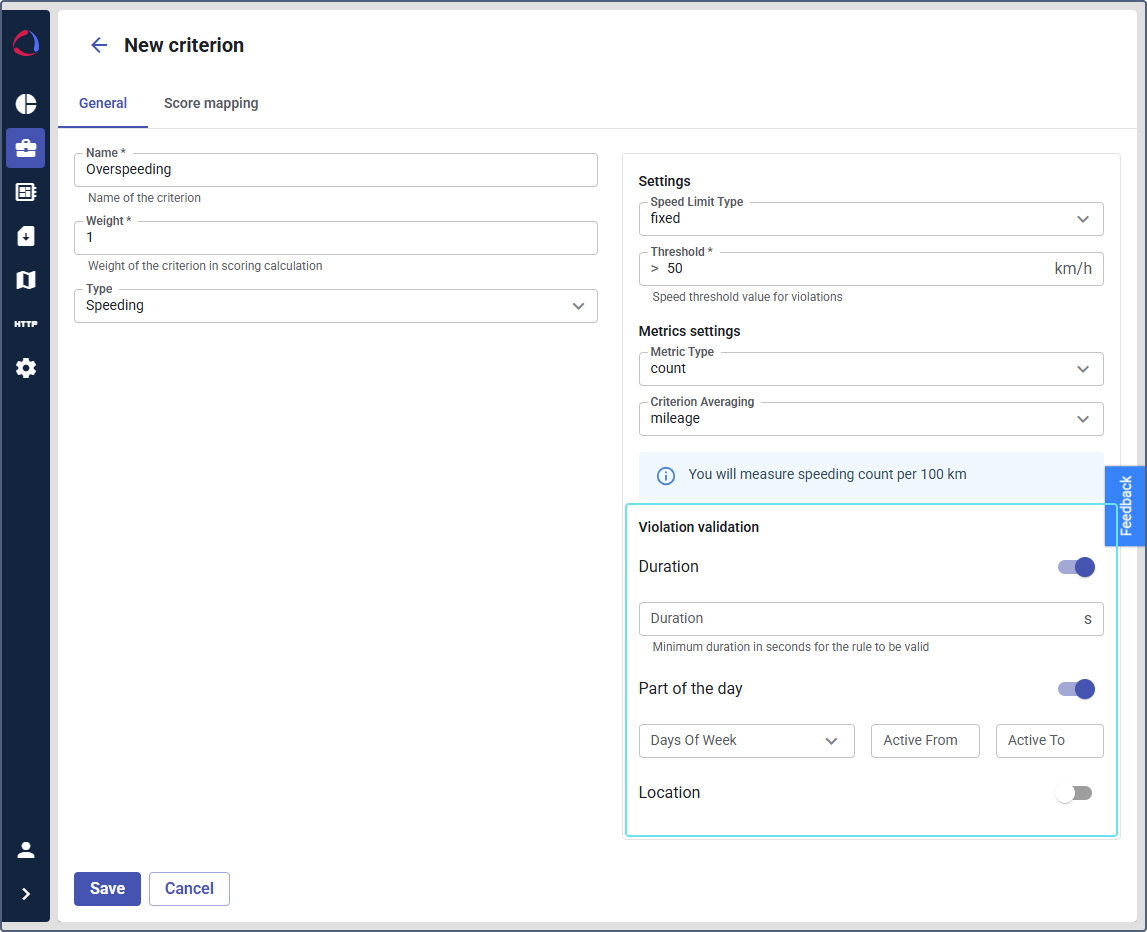
You can configure the violation validation using the following options:
Duration
Toggle on this option to set a minimum time for a violation to be considered valid. For example, set the duration to 14 seconds. Violations shorter than this time won’t be counted.
Part of the day
Turn on this toggle tto define when violations should be detected and reported. You can configure the days of the week, a time range, or both. When both are specified, violations are only be detected during the specified hours on the selected days.
-
Days of week: Select specific days when violations should be monitored (default: Monday-Friday). At least one day must be selected when the Part of the day toggle is enabled. If no time range is set, violations will be detected for the entire 24-hour period on selected days.
-
Active from, Active to: Define the time range for monitoring violations (default: 09:00-18:00). If no days are selected, violations are detected during these hours every day of the week.
Disabling the toggle erases your custom schedule settings. When disabled, violations are monitored 24/7 without any time restrictions.
Location
Enable this option to restrict violations to specific geographical areas. You can select one or more Geofences from the dropdown list. Any violation occurring outside the selected geofences will not be counted.