Completing forms
This page provides instructions for drivers on how drivers can view, complete, and review their assigned inspection forms using their Wialon Driver mobile application.
Customer users (for example, a dispatcher or any other designated staff member) can complete forms from the FleetSpace interface. See the page Completing forms in the Forms section.
Who can do it: Customer driver
Where: Wialon Driver mobile app
Viewing and completing forms
As a driver, you can view and complete assigned forms from the Wialon Driver mobile application.
-
Log in to Wialon Driver on your mobile device using the realm and credentials provided by your manager.
-
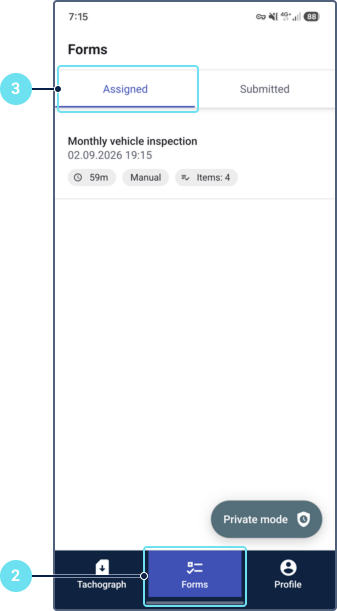
Navigate to the Forms tab.
-
Go to the Assigned tab to see a list of all forms currently assigned to you.
-
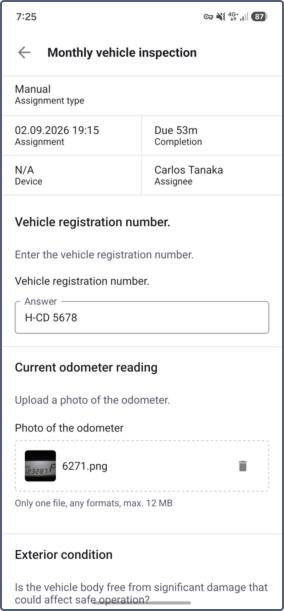
Tap on a specific form to open it and view all the questions.
-
To complete and submit a form, do the following:
- Type your answers into the designated text fields.
- Select options for binary checks, checkboxes, or multiple-choice questions.
- Upload images if required.
- Provide an electronic signature if required (draw your signature on the screen).
- Click Save to submit the form.
The form is completed and submitted. You can’t edit it after submission.
Viewing submitted forms
You can access your previously submitted forms, which can be helpful in case of disputes or to remind yourself of the device’s state on a specific date.
To view submitted forms in Wialon Driver, follow these steps:
-
Log in to Wialon Driver on your mobile device using the credentials provided by your manager.
-
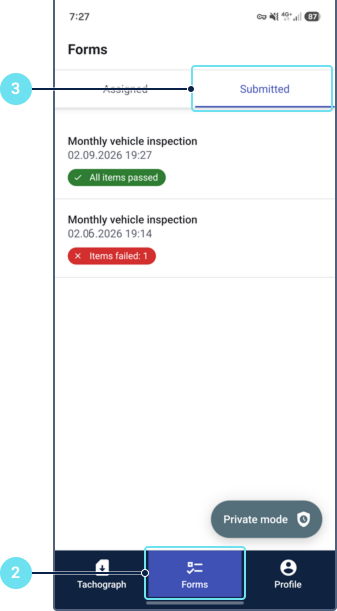
Navigate to the Forms tab.
-
Go to the Submitted tab to see a list of all forms submitted by you.
-
Tap on a specific form to open it and view all the answers.
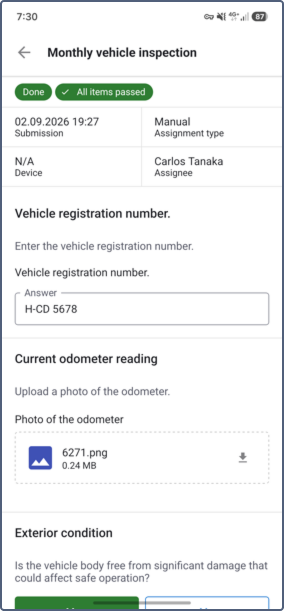
You can’t edit submitted forms.
Managing forms from push notifications
If your service provider has configured push notifications for form events, you can open a form directly from the notification.
To receive push notifications, enable the Push notifications toggle in your profile settings. See Managing your profile for details.
Tap the push notification on your device to open the form. The app automatically refreshes the form data to make sure you see the latest information.