Enabling analytics items for customers
Who can do it: Service provider
Where: Wialon Platform Studio
To make analytics items available to a customer in Wialon Platform FleetSpace, you must enable the Analytics builder feature for the customer account and enable individual analytics items on the Analytics page.
Enabling the “Analytics builder” feature
To enable the Analytics builder for a customer, assign them a billing plan that includes this feature. See Assigning billing plans to customers for information about the available billing plans and how to assign them.
After that, the customer can see enabled analytics items on the Reports and Dashboard page in Wialon Platform FleetSpace.
Enabling and disabling analytics items
An analytics item must be enabled on the Analytics page to be available to customers in Wialon Platform FleetSpace. Disabled items aren’t visible to customers.
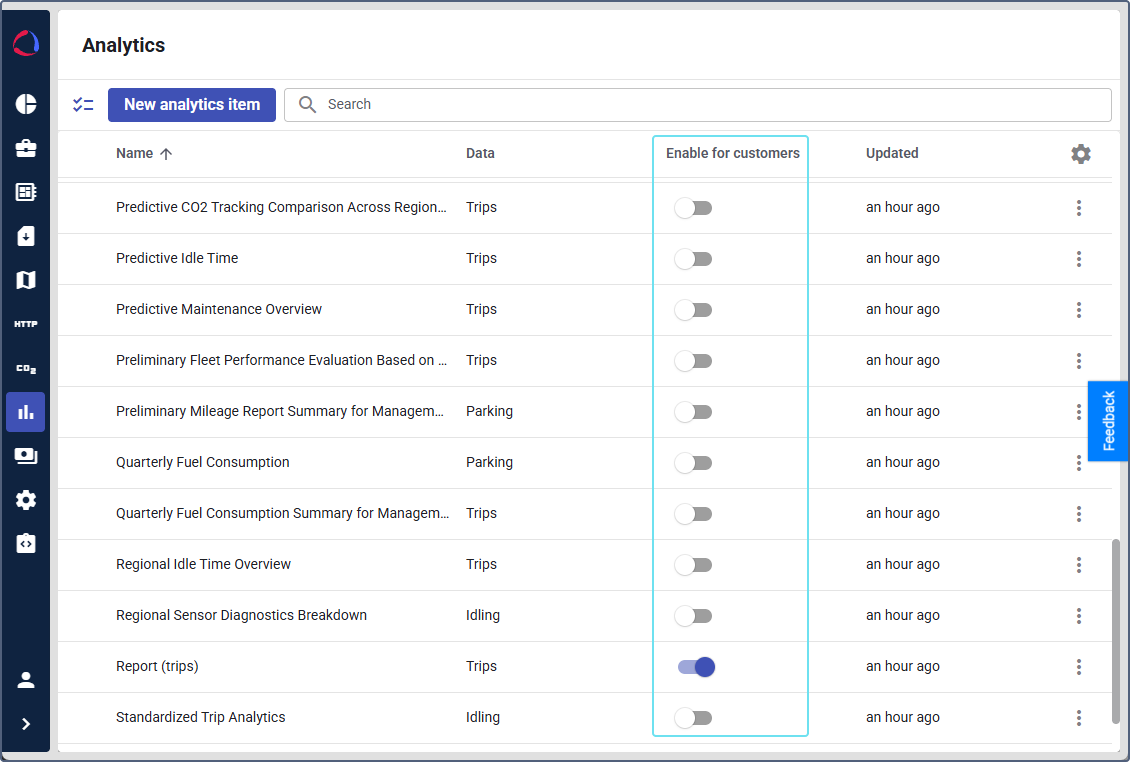
To change the status of an item, use the Enable for customers toggle either in the table on the Analytics page or inside the item builder.
For details on managing analytics items, see Managing analytics items.
Features available after enabling
Once the Analytics builder feature is enabled, the following features become available:
Wialon Platform Studio
- Analytics page in the sidebar.
- Custom reports and widgets permission in the Entities section of user permissions and roles.
Wialon Platform FleetSpace
- Custom reports available on the Reports page.
- Custom widgets available on the Dashboard page.