Creating a new customer from a template
Who can do it: Service provider
Where: Wialon Platform Studio
This process allows you to quickly set up a new customer account using a predefined configuration.
-
In the navigation menu, go to the Customers page.
If you haven’t created any customers yet, use the buttons on the guided empty page to create a customer or a customer template.
-
Click New customer.
-
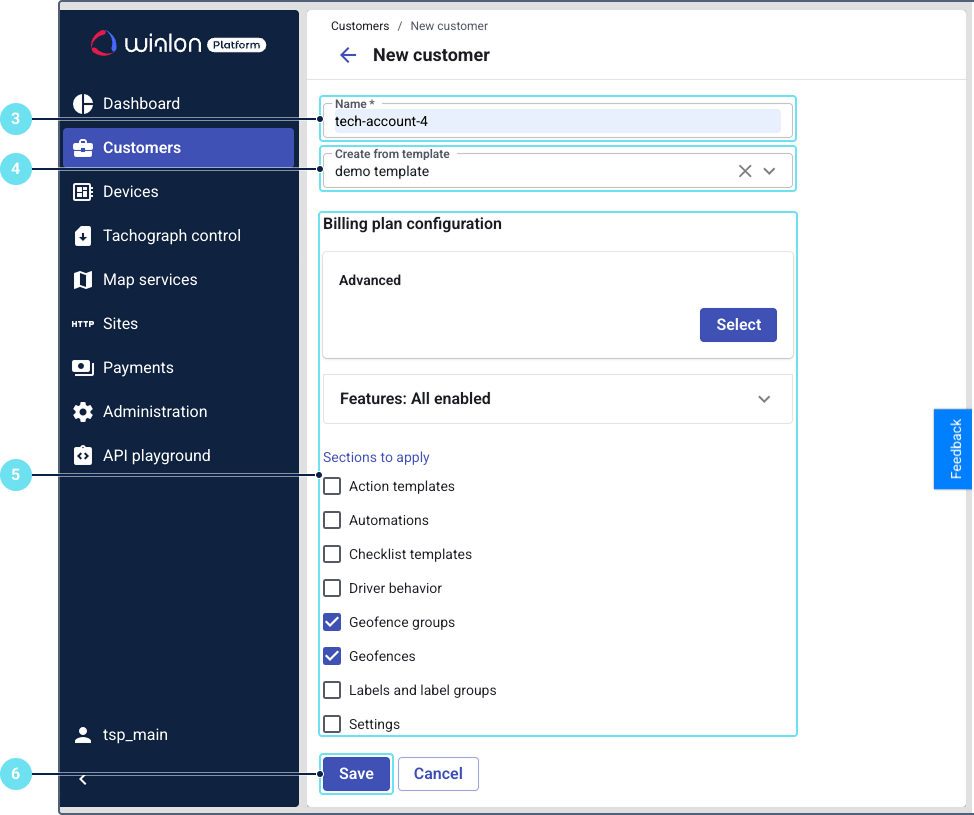
Enter the customer name.
-
In Create from template field, select the required customer template.
-
Define the entities or settings you want to add to this customer account from the template:
- Billing plan and enabled features
- Action templates
- Automations
- Form templates
- Geofence groups
- Geofences
- Labels and label groups
- Settings
-
Confirm the creation.
The system will create the new customer and automatically import the selected entities or settings from the template.