Managing the channels list
The Channels page shows all the channels created in your account with the following columns: Name, Protocol, Enabled, Autocreate, and URI.
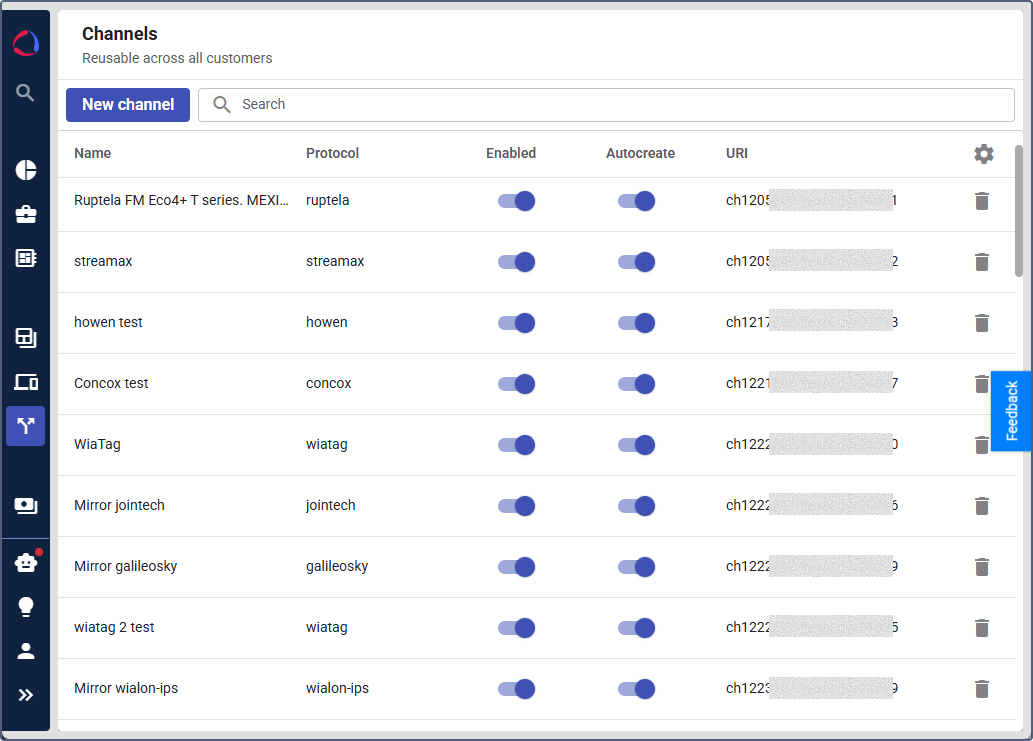
The Enabled and Autocreate columns contain toggles, so you can change these settings directly in the list without opening the channel.
You can’t disable the Autocreate option of an enabled channel. To do this, turn off the Enabled toggle first, disable the Autocreate option, and then turn the channel on again.
Searching channels
To find the required channels, use the search field above the list. The following filters are available:
- Item name: the channel name. You can select several names.
- Channel protocol: the protocol of the channel. You can select several protocols.
- Enabled: Yes or No.
- Autocreate: Yes or No.
The search works in the same way as on the other Studio pages. See Searching and filtering devices.
Adjusting the channels table
You can manage the channels table the same way as the devices table. See Managing the table.