Setting the time zone
Who can do it: Service provider
Where: Wialon Platform Studio
A customer inherits the time zone from the service provider settings by default. You can configure a specific time zone for a customer if they operate in a different geographical region.
To customize the time zone for a customer:
-
Go to the Customers page.
-
Select the required customer from the list.
-
Navigate to the Settings tab.
-
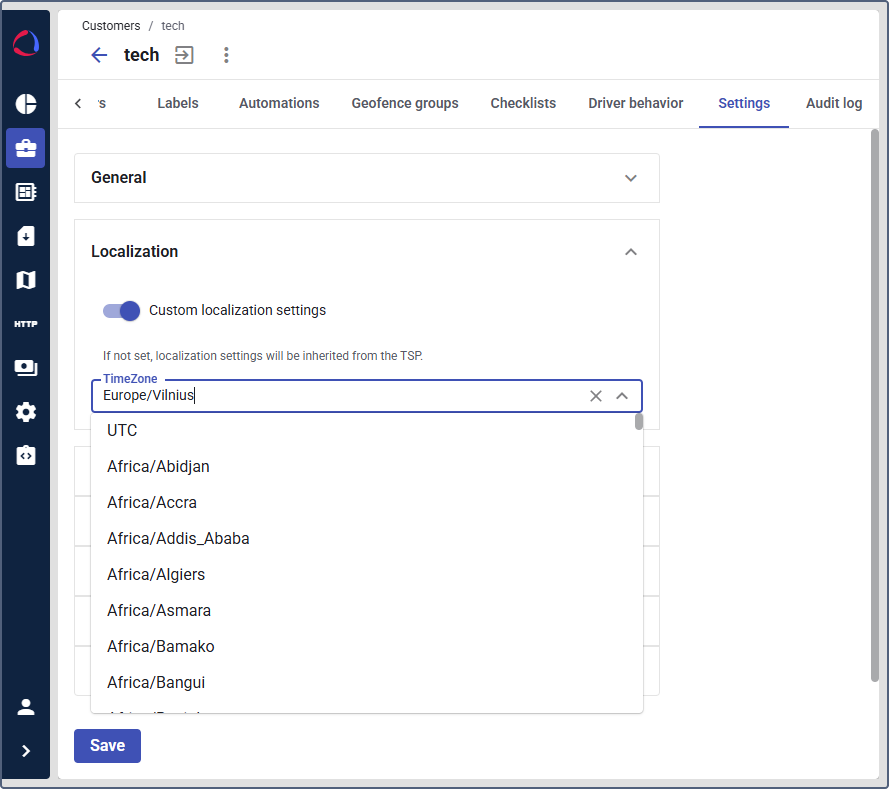
Expand the Localization section.
-
Enable the Custom localization settings toggle.
-
In the Time zone field, select the time zone from the dropdown list. The time zone must match the one set on your customer’s device.
-
Click Save.
After saving, the selected time zone will be applied to server-side operations such as scheduled automations and command execution, while interface timestamps will display based on the user’s system time.