Viewing emissions settings
Who can do it: Service provider Where: Wialon Platform Studio
Emission factors are standardized conversion coefficients that define how much greenhouse gas (measured in kg CO2e) is produced per unit of fuel consumed. These factors are published by official government sources and are preloaded into the platform.
To access the list of emission factors, expand the Resources section in the navigation menu and open the Emissions standards page.
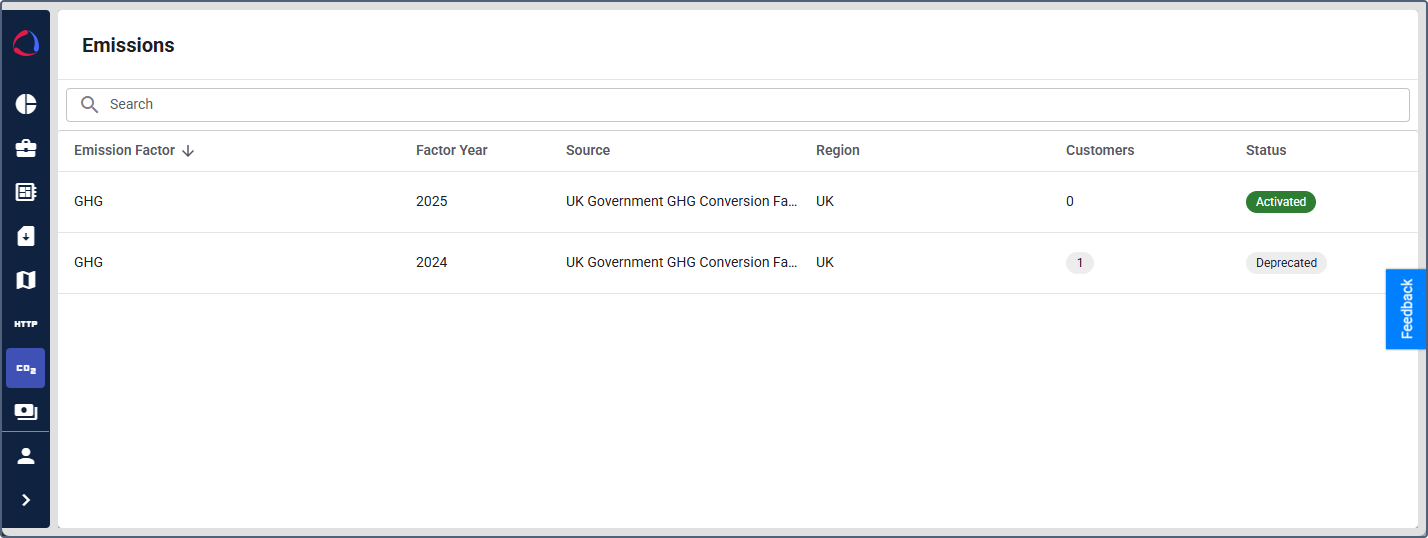
The page displays a table with the following columns:
- Emission factor: The name of the emission factor dataset (for example, GHG).
- Factor year: The year of the emission factor dataset (for example, 2025). Each dataset is published annually with updated coefficients.
- Source: The official source of the data (for example, UK Government GHG Conversion Factors).
- Region: The geographic region the factors apply to (for example, UK).
- Customers: The number of customers using this emission factor. Hover over the count to see the customer names.
- Status: The current status of the emission factor: Activated or Deprecated.
You can sort the table by clicking on a column header. To search for a specific emission factor by fuel type, use the search bar at the top of the page.
Viewing emission factor details
To view the conversion coefficients for a specific emission factor, click its row in the list. The detail page opens with a table of fuel types and their CO2e values.
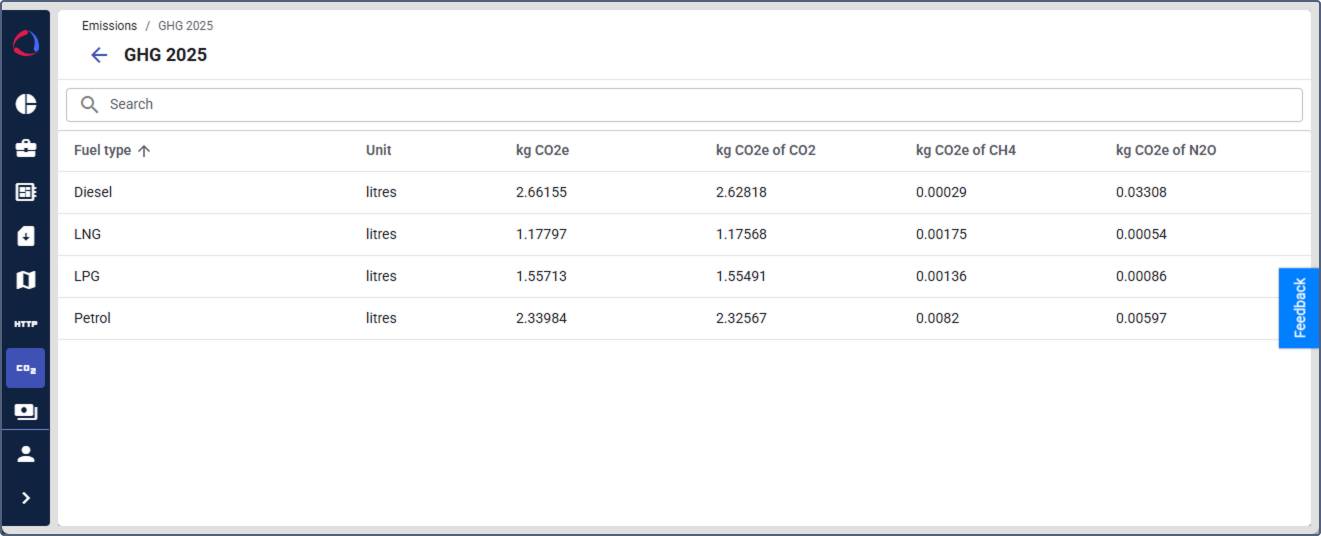
The table contains the following columns:
- Fuel type: The type of fuel, such as Diesel, LNG, LPG, or Petrol.
- Unit: The unit of measurement for the fuel, such as litres.
- kg CO2e: The total kilograms of CO2 equivalent produced per unit of fuel. This value combines all greenhouse gases.
- kg CO2e of CO2: The carbon dioxide (CO2) component of the total kg CO2e value.
- kg CO2e of CH4: The methane (CH4) component of the total kg CO2e value.
- kg CO2e of N2O: The nitrous oxide (N2O) component of the total kg CO2e value.
Use the search bar to filter the fuel types by name.
Emission factor datasets are managed by the platform and can’t be edited by service providers. When a new version of an emission factor is published, the previous version is marked as Deprecated and the new version becomes Activated. If you want to add an emission factor that isn’t in the system yet, contact technical support via support@wialon.com.